
Amazon Seller GST Compliance: The Complete India Guide (2025-26)
TL;DR — the 30-second version
• Selling on Amazon? You need GST registration from your very first sale. The Rs 40 lakh / Rs 20 lakh turnover limit does not apply to online sellers.
• Amazon deducts 1% TCS (Tax Collected at Source) on your net sales. You claim it back as credit in your GST returns.
• You file GSTR-1 and GSTR-3B every month or quarter. Amazon files GSTR-8 for the TCS it collected.
• Match Amazon’s GSTR-8 with your books each month, or you lose credit and invite notices.
• Get this set up once, correctly, and the monthly work becomes a 30-minute checklist.
You found a product. You listed it on Amazon. The orders are coming in. Then Amazon asks for a GSTIN (Goods and Services Tax Identification Number) and the spreadsheet panic begins. Sound familiar?
Here is the good news: Amazon seller GST compliance is rule-bound and predictable. Once you understand registration, TCS, and returns, it becomes a simple monthly routine. This guide explains every step in plain English, with rupee examples you can copy, updated for FY 2025-26. It is written for both first-time founders and busy SME (small and medium enterprise) owners.
Do Amazon sellers really need GST registration?
Yes. In most cases, you must register for GST before you sell a single product on Amazon. Normal businesses get a turnover exemption (Rs 40 lakh for goods in most states, Rs 20 lakh in special-category states). That exemption does not apply to e-commerce sellers.
Under the Central Goods and Services Tax law, anyone supplying goods through an e-commerce operator must register, no matter how small the sale. So even Rs 5,000 of yearly sales needs a GSTIN. You can confirm the rules on the official GST portal.
 Watch out: Selling without GST is the most common Amazon seller mistake. Amazon will not let you list taxable goods without a valid GSTIN, and selling unregistered can attract a penalty. Register first, sell later.
Is there any case where you can sell without GST?
A narrow one. If you sell only goods that are fully GST-exempt (such as certain unbranded food items) you may not need to register. But the moment you list even one taxable product, the e-commerce rule kicks in and registration becomes mandatory.
Service sellers get a small relief: those supplying services through an e-commerce platform may use the Rs 20 lakh threshold. But for the vast majority of Amazon sellers, who sell physical goods, the answer is simple: register from day one. When in doubt, our accounting and compliance team can confirm your exact position in one call.
Documents you need for GST registration
Keep these ready before you start. Having clean documents avoids rejection and re-uploads.
PAN card of the business or proprietor.
Aadhaar of the proprietor or partners, for e-verification.
Business address proof such as a rent agreement, electricity bill, or property tax receipt.
Bank details like a cancelled cheque or bank statement.
Photographs of the owner, partners, or directors.
Incorporation proof such as a partnership deed or certificate of incorporation, if you are not a sole proprietor.
:check_mark_button: Founder tip: Use the same legal name and address on your GST registration, your bank account, and your Amazon seller account. Mismatches cause TCS-credit problems later.
How to register for GST: step by step
The full process is online and usually takes about 5 to 7 working days.
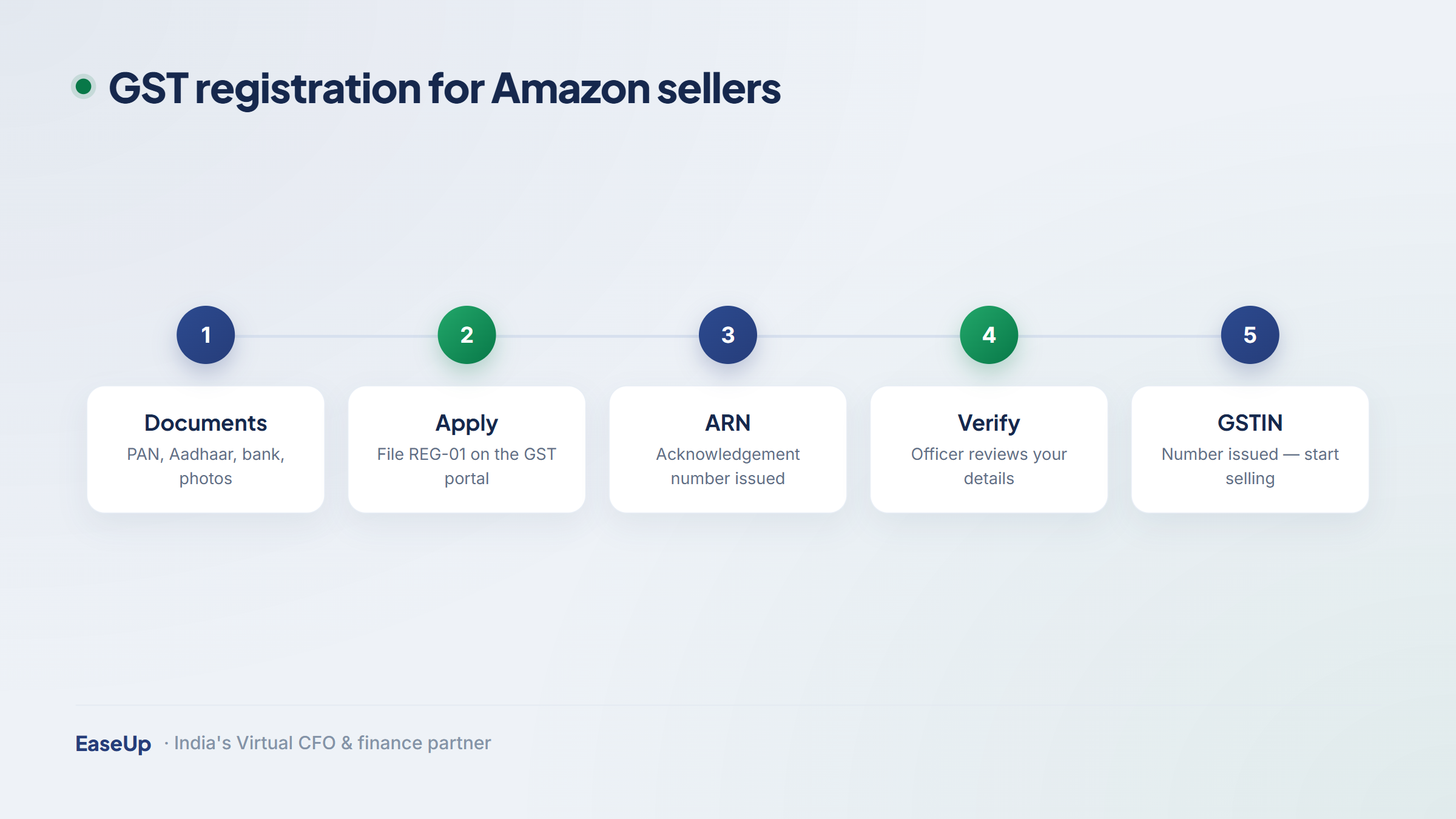
Go to the GST portal and open Services, then Registration, then New Registration.
Fill Part A with your PAN, mobile number, and email. You will get a Temporary Reference Number (TRN).
Fill Part B with business details, promoter details, and your place of business.
Upload documents and verify using Aadhaar e-verification, which speeds approval.
Get your GSTIN once the officer approves. Note the 15-digit number carefully.
Add it to Amazon in Seller Central under your tax settings, and you are live.
What is TCS and how much does Amazon deduct?
TCS stands for Tax Collected at Source. Amazon, as the e-commerce operator, collects a small slice of tax from your sales and deposits it with the government in your name. The current rate is 1% of the net taxable value of your sales (0.5% Central GST plus 0.5% State GST for sales within your state).
Net taxable value means sales after returns and cancellations. Here is a simple worked example.
Item | Amount (Rs) |
Gross sales in a month | 1,00,000 |
Less: returns and cancellations | 10,000 |
Net taxable value | 90,000 |
TCS at 1% | 900 |
Amount Amazon deposits as your TCS credit | 900 |
That Rs 900 is not a cost. It is your money, sitting as a credit you will use to pay your own GST. You will see it appear in your electronic cash ledger on the GST portal.
GST returns every Amazon seller must file
Three returns matter. Two you file, one Amazon files for you.
Return | Who files it | What it covers | Typical due date |
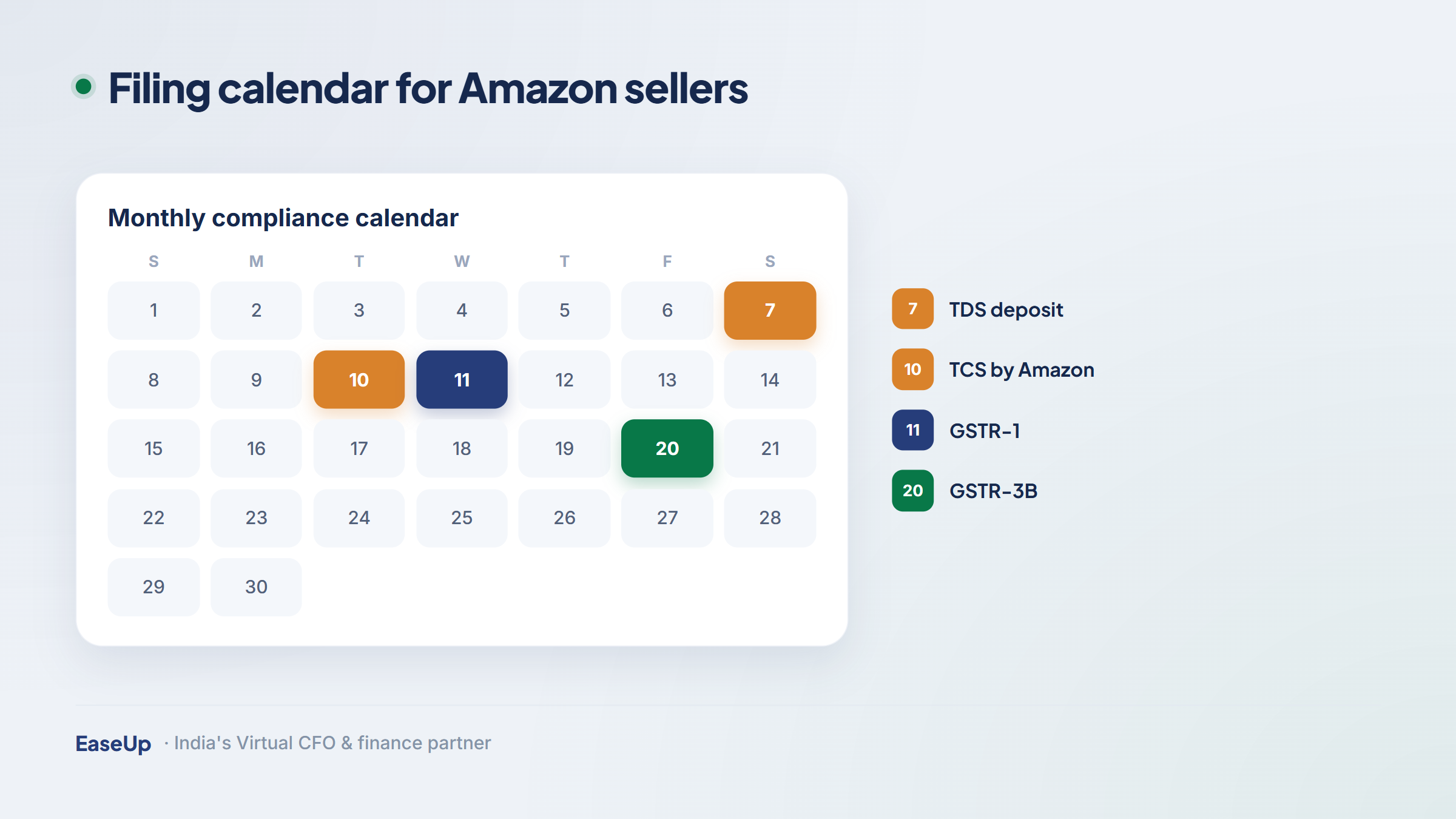
GSTR-1 | You | Your invoice-wise and state-wise sales | 11th of next month (or quarterly under QRMP) |
GSTR-3B | You | Summary of sales, input credit, and tax payment | 20th of next month (or quarterly under QRMP) |
GSTR-8 | Amazon | The 1% TCS Amazon collected on your sales | 10th of next month |
When Amazon files GSTR-8, the TCS shows up in your GST account. You accept it, and that credit lowers the cash you actually pay. Small sellers can opt for the QRMP scheme (Quarterly Return, Monthly Payment) to file returns quarterly while paying tax monthly.
 Note: File a NIL return even in months with zero sales. Skipping a return blocks the next month’s filing and triggers a late fee that grows every day.
How to claim your TCS credit (worked example)
This is where most sellers leave money on the table. Follow the flow and you never will.
Step | What happens | Amount (Rs) |
1 | Your GST liability on sales for the month | 4,500 |
2 | TCS credit Amazon deposited (from GSTR-8) | 900 |
3 | Input tax credit on your purchases | 1,500 |
4 | Cash you actually pay = 4,500 - 900 - 1,500 | 2,100 |
So a Rs 4,500 bill becomes a Rs 2,100 cash payment once you apply your TCS and input credit. If your TCS credit is bigger than your liability, it simply carries forward, and you can claim a refund if it keeps building up. Strong bookkeeping is what makes this accurate month after month.
Reconciliation: the habit that keeps you safe
Every month, match three things: your own sales records, Amazon’s settlement report, and the TCS in your GSTR-2A / GSTR-2B (the auto-filled credit statements on the GST portal). When all three agree, you have claimed every rupee of credit and your returns will not raise flags.
Watch out: A common gap: Amazon shows a sale in one state, but you reported it in another. Place-of-supply errors break your reconciliation and can cause demand notices. Always map each sale to the buyer’s delivery state.
E-invoicing and the turnover thresholds to watch
E-invoicing means generating invoices through the government portal so each one gets a unique reference number. It becomes mandatory once your annual turnover crosses Rs 5 crore. Below that, you issue normal GST invoices.
Two more thresholds matter as you scale. E-way bills are needed for goods movement above Rs 50,000. And income from your store is business income, taxed under the Income Tax rules, so keep your GST and income-tax records aligned. As you grow, a virtual CFO can manage these thresholds before they become deadlines.
Penalties: what non-compliance actually costs
The fines are small individually but stack up fast and damage your seller account standing.
Mistake | What it can cost |
Late filing of GSTR-1 or GSTR-3B | Rs 50 per day (Rs 20 per day for NIL returns), up to a cap |
Not registering when required | Penalty up to Rs 10,000 or the tax due, whichever is higher |
Wrong or missed TCS reconciliation | Lost credit plus interest at 18% per year on short-paid tax |
Ignoring a GST notice | Escalating demand, interest, and possible registration cancellation |
None of these are dramatic on their own. The damage is the snowball: a missed return blocks the next one, the late fee compounds, and credits get stuck. Consistency beats catch-up every time.
A simple monthly compliance checklist
Pin this. Doing the same five things each month keeps you fully compliant and stress-free.
Download your Amazon settlement and tax reports for the month.
Reconcile sales and TCS against your books and your GSTR-2B.
File GSTR-1 with invoice-wise sales by the due date.
File GSTR-3B after applying TCS and input credit, then pay the balance.
Save records and note any credit carried forward for next month.
:check_mark_button: Founder tip: Block the same two hours every month for this. Treating compliance as a fixed calendar habit, not a last-minute scramble, is the single biggest predictor of a clean GST record.
When to bring in a finance partner
Doing it yourself works at the start. But once you sell across many states, add SKUs, or cross the e-invoicing threshold, the reconciliation grows complex and one missed credit costs more than a year of professional help. A qualified Chartered Accountant or a managed finance team removes that risk.
At EaseUp, we handle registration, monthly returns, TCS reconciliation, and notices end to end through our accounting and compliance service, so you can focus on growing sales. New founders can also explore benefits on the Startup India portal.
Yes, in almost all cases. The usual turnover exemption of Rs 40 lakh or Rs 20 lakh does not apply to sellers of goods on e-commerce platforms. You must have a valid GSTIN before you can list taxable products on Amazon, even if your sales are very small.
Amazon deducts 1% TCS (Tax Collected at Source) on the net taxable value of your sales, meaning sales after returns and cancellations. On Rs 90,000 of net sales, that is Rs 900. This amount is not a cost; it is a credit you use to pay your own GST liability.
You file GSTR-1 for your sales and GSTR-3B to pay tax after credits. Amazon files GSTR-8 for the TCS it collected on your behalf. GSTR-1 and GSTR-3B can be filed monthly or quarterly under the QRMP scheme, while GSTR-8 is filed by Amazon by the 10th of each month.
Yes. The TCS Amazon deposits appears as a credit in your electronic cash ledger on the GST portal once Amazon files GSTR-8 and you accept it. You use that credit to reduce the cash GST you pay. If unused credit keeps building up, you can carry it forward or claim a refund.
Missing a return blocks you from filing the next one and triggers a late fee of about Rs 50 per day (Rs 20 for NIL returns) plus 18% annual interest on any unpaid tax. Repeated defaults can lead to notices and even cancellation of your GST registration, so file on time every month, even NIL returns.
This article is for general information only and is current as of FY 2025-26. GST rules and rates change; please verify on official government portals or consult a qualified professional before acting.


Your trusted partner for all your Financial needs.


Finance Management
Strategic Services